Every insight Brightwave generates is backed by citations that trace back to specific passages in your documents.
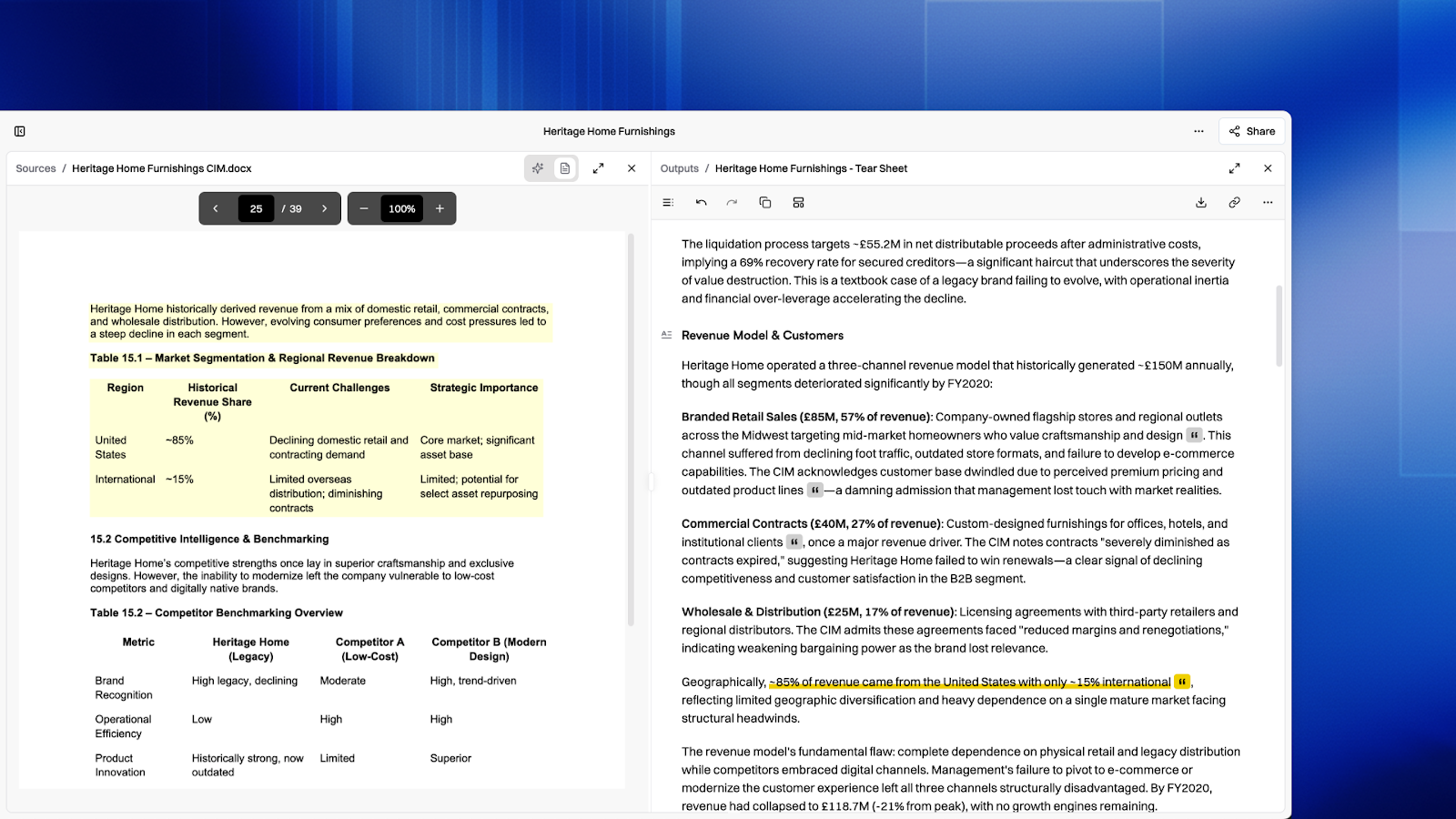
How citations work
When an agent generates output, it identifies the specific passages in your source documents that support each claim. Citations are linked directly to the source text, so you can verify any finding.
Citation highlighting
Click a citation to open the source document in the viewer. Citation highlighting works across all supported document types — PDFs, text files, Markdown, spreadsheets, and more. Brightwave takes you directly to the exact place in the document: the relevant passage, field, or cell that backs the finding.
- PDF documents — highlighted with yellow bounding boxes on the page. Multi-page citations are supported and the viewer scrolls to the correct location.
- Text and Markdown files — the cited passage is highlighted inline within the document viewer.
- Spreadsheets — the specific cell or range is identified in the viewer.
Citations across output types
Citations appear natively on the platform across all output types — reports, tables, grids, presentations, spreadsheets, and search results. In grids, individual cells include citations. In reports, citations are inline within section text. In presentations, citations appear below each slide — click one to view the source passage. In spreadsheets, citations are attached as Excel comments on cited cells. See Agents & Outputs for details on each output type.
Citation audit
Use citation audit to verify the accuracy of every citation in an agent's output. Click the audit icon on any message or output that contains citations — Brightwave evaluates each citation against the source passage and classifies it:
- Verified — the citation accurately supports the claim.
- Uncertain — the citation is partially relevant or may need review.
- Needs attention — the citation may not support the claim. Check the source directly.
While audit mode is active, click any citation to see its evaluation details and navigate to the source document at the same time.
Citations on export
When you export an output, citations are preserved in a readable format. Spreadsheet exports include Excel comments with source references on cited cells. Presentation exports include citation references as speaker notes (in the platform they appear below each slide, but on export they become speaker notes in the PowerPoint file). Report and document exports include inline citation markers.